EcoPlots Observations Workflow
The EcoPlots client in observations mode (the default) lets you discover
and retrieve ecological observation data across Australia — including site visits,
feature types, and measured properties — all returned as tidy DataFrames ready
for analysis.
from terndata.ecoplots import EcoPlots

ec = EcoPlots()                          # mode="observations" by default
ec.select(dataset="TERN Surveillance")   # add one or more filters
ec.preview()                             # quick look before full download
df = ec.get_data()                       # retrieve as GeoDataFrame
Note
All methods on this page are available on both
EcoPlots (synchronous) and
AsyncEcoPlots (asynchronous).
For AsyncEcoPlots, use df = await ec.get_data() in the final step,
or async for chunk in ec.get_data_stream(...) for streaming workflows.
Note
A runnable walkthrough of all observations-mode features is available in the Observations Demo Notebook.
Creating the Client
from terndata.ecoplots import EcoPlots

# No arguments needed — all filters start empty
ec = EcoPlots()

# Mode names are validated and resolved case-insensitively
ec = EcoPlots("observations")

# Or pre-load a saved project
ec = EcoPlots.load("my_project.ecoproj")
Selectables & Discoverable Facets
Filters passed to select() are called facets. The table below lists
every facet available in observations mode, what it represents, and the
discovery method you can call to see valid values for it.
Facet |
Type |
Description |
Discover with |
|---|---|---|---|
|
str / list |
Dataset(s) to include in the query. |
|
|
str / list |
One or more site identifiers. |
|
|
str / list |
Specific site-visit identifiers. |
|
|
str |
Category of geographic region (e.g. |
|
|
str / list |
Region name(s) within the chosen |
|
|
str / list |
Ecological feature type (e.g. plant individual, soil layer). |
|
|
str / list |
Measured or observed property (e.g. basal area, soil pH). |
|
|
WKT / GeoJSON |
Spatial bounding geometry to restrict results geographically.
Set interactively via |
|
|
str / list |
Project label associated with the observations. |
— |
Discovery Methods
Use these methods to explore what data is available before downloading. They
all return pandas.DataFrame and respect your current filters, so you
can narrow results step by step.
Unified Discovery
- EcoPlots.discover(facet, **kwargs)[source]
Discover available values for a facet using the public get_* methods.
This is a convenience dispatcher for users who prefer a single discovery entry point. Existing methods such as
get_datasources(),get_sites(), andget_feature_types()remain the canonical explicit methods.- Parameters:
facet (str) – Discovery facet or common alias, for example
"dataset","site_id","region", or"feature_type".**kwargs – Extra arguments required by specific facets.
regiondiscovery requiresregion_type.
- Returns:
A pandas DataFrame containing discovered values.
- Return type:
DataFrame
Example
ec.discover("dataset")
ec.discover("site_id", include_region=True)
ec.discover("site_attributes_data")
Datasets
- EcoPlots.get_datasources()[source]
Get the data sources available for applied filters.
- Returns:
A DataFrame containing the data sources.
- Return type:
DataFrame
- EcoPlots.get_datasources_attributes()[source]
Get the attributes of data sources from the applied filters.
- Returns:
A DataFrame containing the attributes of the data sources.
- Return type:
DataFrame
Example
ec.get_datasources()
Sites
- EcoPlots.get_sites(include_region=False)[source]
Get the sites from the applied filters.
- Parameters:
include_region (bool) – When True, site discovery includes region membership metadata. Observation mode sends
include-regions=Trueto the standard site discovery endpoint. Samples mode first discovers sample site buckets, then calls/discovery/site_id?include-regions=Truewith a temporary query containing only those site URLs. The API returns region types in a nestedregionsmapping; this method flattens that mapping so region types become DataFrame columns, for exampleIBRA7 BioregionsandStates and Territories.- Returns:
A DataFrame containing the sites.
- Return type:
DataFrame
Examples
ec = EcoPlots()
sites = ec.get_sites()
sites_with_regions = ec.get_sites(include_region=True)

samples = EcoPlots("samples")
samples.select(material_sample_type="Soil Pit Sample")
sample_sites = samples.get_sites(include_region=True)
- EcoPlots.get_sites_attributes()[source]
Alias for
get_site_attributes().- Return type:
DataFrame
- EcoPlots.get_site_attributes_data()[source]
Get site attribute values for the current filters.
Calls
/data/attributes/sitewithdformat=csvas a URL parameter and the current query filters in the request body. The API returns one CSV row per site, with columns such asid,label,wkt_point,bioregion,locationName,plotArea, andsiteNote.- Returns:
A DataFrame containing site attribute values for the current filters.
- Return type:
DataFrame
Examples
ec = EcoPlots()
ec.select(site_id="TCFTNS0002")
site_attributes = ec.get_site_attributes_data()
- EcoPlots.get_site_visit_attributes()[source]
Get the attributes of site visits from the applied filters.
- Returns:
A DataFrame containing the attributes of the site visits.
- Return type:
DataFrame
- EcoPlots.get_site_visit_attributes_data()[source]
Get site-visit attribute values for the current filters.
Calls
/data/attributes/site-visitwithdformat=csvas a URL parameter and the current query filters in the request body. The API returns CSV data for site visits matching the current filters.- Returns:
A DataFrame containing site-visit attribute values for the current filters.
- Return type:
DataFrame
Examples
ec = EcoPlots()
ec.select(site_id="TCFTNS0002")
site_visit_attributes = ec.get_site_visit_attributes_data()
Example
ec.get_sites()
ec.get_sites(include_region=True)
ec.get_site_attributes_data()
ec.get_site_visit_attributes_data()
Regions
- EcoPlots.get_region_types()[source]
Get the available region types from the applied filters.
- Returns:
A DataFrame containing the region types.
- Return type:
DataFrame
- EcoPlots.get_regions(region_type)[source]
Get the available regions for a specific region type from the applied filters.
- Parameters:
region_type (str) – The region type to retrieve regions for.
- Returns:
A DataFrame containing the regions for the specified region type.
- Return type:
DataFrame
Example
# Step 1: see what region types are available
ec.get_region_types()

# Step 2: list regions within a type
ec.get_regions("bioregions")
Feature Types & Observed Properties
- EcoPlots.get_feature_types()[source]
Get the feature types from the applied filters.
- Returns:
A DataFrame containing the feature types.
- Return type:
DataFrame
- EcoPlots.get_observed_properties()[source]
Get the observed properties from the applied filters.
- Returns:
A DataFrame containing the observed properties.
- Return type:
DataFrame
- EcoPlots.get_observation_attributes()[source]
Get the attributes of observations from the applied filters. Available only in “observations” mode.
- Returns:
A DataFrame containing the attributes of the observations.
- Raises:
EcoPlotsError – If called in a mode other than “observations”.
- Return type:
DataFrame
Example
ec.get_feature_types()
ec.get_observed_properties()
Filter Methods
Once you know what data exists, use these methods to narrow your selection.
All filter methods return self so they can be chained.
- EcoPlots.select(filters=None, **kwargs)
Add/merge filters and validate them.
Accepts either a dict or keyword arguments.
- Parameters:
filters (dict | None) – Mapping like
{"site_id": [...], "dataset": [...]}.**kwargs –
Alternative way to pass filters, e.g.
site_id="ABC". Special keyword filters (handled separately from facet resolution):spatial: WKT string or GeoJSON geometrydictto spatially restrict results to a custom region.has_image(bool, samples mode only): Limit to samples that have attached images.soil_subsite_id(intorlist[int], samples mode only): Restrict to specific soil sub-site identifiers.soil_depth_range([min, max]or{"min": x, "max": y}, samples mode only): Filter samples by soil depth in metres.date_from(str): Earliest date (inclusive) in any recognisable format —"DD/MM/YYYY","21 May 2020","21st May 2020","YYYY-MM-DD"etc. Normalised to"YYYY-MM-DD"internally. Day-first is assumed for all-numeric inputs (MM-DD-YYYYis never accepted).date_to(str): Latest date (inclusive), same format rules asdate_from.
self (SelfType)
- Raises:
EcoPlotsError – Unknown filter keys.
EcoPlotsError –
regionprovided without current or newregion_type.
- Returns:
self for chaining.
- Return type:
SelfType
- EcoPlots.remove(filters=None, **kwargs)
Remove whole facets or specific values (same ergonomics as
select).- Accepts either a dict or keyword arguments. For each facet:
value is
None→ remove the entire facetvalue is a string → remove that single value
value is a list/tuple → remove those values
- Parameters:
filters (dict | None) – Mapping like
{"site_id": ["TCFTNS0002"], "dataset": None}.**kwargs – Alternative way to pass removals, e.g.
site_id="TCFTNS0002".self (SelfType)
- Raises:
EcoPlotsError – Unknown filter keys (not in
QUERY_FACETS).EcoPlotsError – If
datasetis targeted while insamplesmode (theTERN Ecosystem Surveillancedataset is protected).KeyError – Facet not present in current filters.
EcoPlotsError – Specific values requested but not found for that facet.
- Returns:
self (chainable)
- Return type:
SelfType
- EcoPlots.clear()
Clear all filters from the instance.
The method mutates the instance and returns it to allow fluent/chained calls.
- Returns:
self (chainable)
- Parameters:
self (SelfType)
- Return type:
SelfType
Notes
In
samplesmode theTERN Ecosystem Surveillancedataset filter is preserved; only user-added filters are cleared.
- EcoPlots.get_filter(facet=None)
Return the current filter values for a specific facet or all applied filters.
- Parameters:
facet (str | None) – The facet to retrieve the filter for. Defaults to All.
- Raises:
EcoPlotsError – If an invalid facet name is provided.
- Returns:
A list of values for the specified facet, or
Noneif the facet is not currently applied. If facet isNone, returns adictmapping each applied facet to its list of values.- Return type:
list | dict | None
- EcoPlots.get_api_query_filters(facet=None)
Return the current query filters for ecoplots API for a specified facet or all facet.
- Parameters:
facet (str | None) – The facet to retrieve the query filters for. Defaults to None.
- Raises:
EcoPlotsError – If an invalid facet name is provided.
- Returns:
A list of resolved API values for the specified facet, or
Noneif the facet is not currently applied. If facet isNone, returns adictof all resolved query filters.- Return type:
list | dict | None
Example
# Add filters
ec.select(
    dataset="TERN Surveillance",
    site_id="TCFTNS0002",
)

# Inspect applied filters
ec.get_filter()              # all filters as a dict
ec.get_filter("site_id")     # single facet as a list

# Remove a specific value
ec.remove(site_id="TCFTNS0002")

# Reset everything
ec.clear()
Spatial Filter Widget
Draw a polygon or rectangle directly on a map to spatially restrict your query.
Install with pip install "terndata.ecoplots[gui]" before using widget
methods.
- EcoPlots.select_spatial(**kwargs)[source]
Open the spatial selection widget.
A minimal map based spatial selector, similar to spatial selection tool in EcoPlots Portal.
- Parameters:
**kwargs – Additional keyword arguments to pass to the widget.
- Returns:
ipywidgets.VBox – The widget. Use it in a notebook cell to display.
Example
# Opens the interactive map widget in a notebook cell
ec.select_spatial()
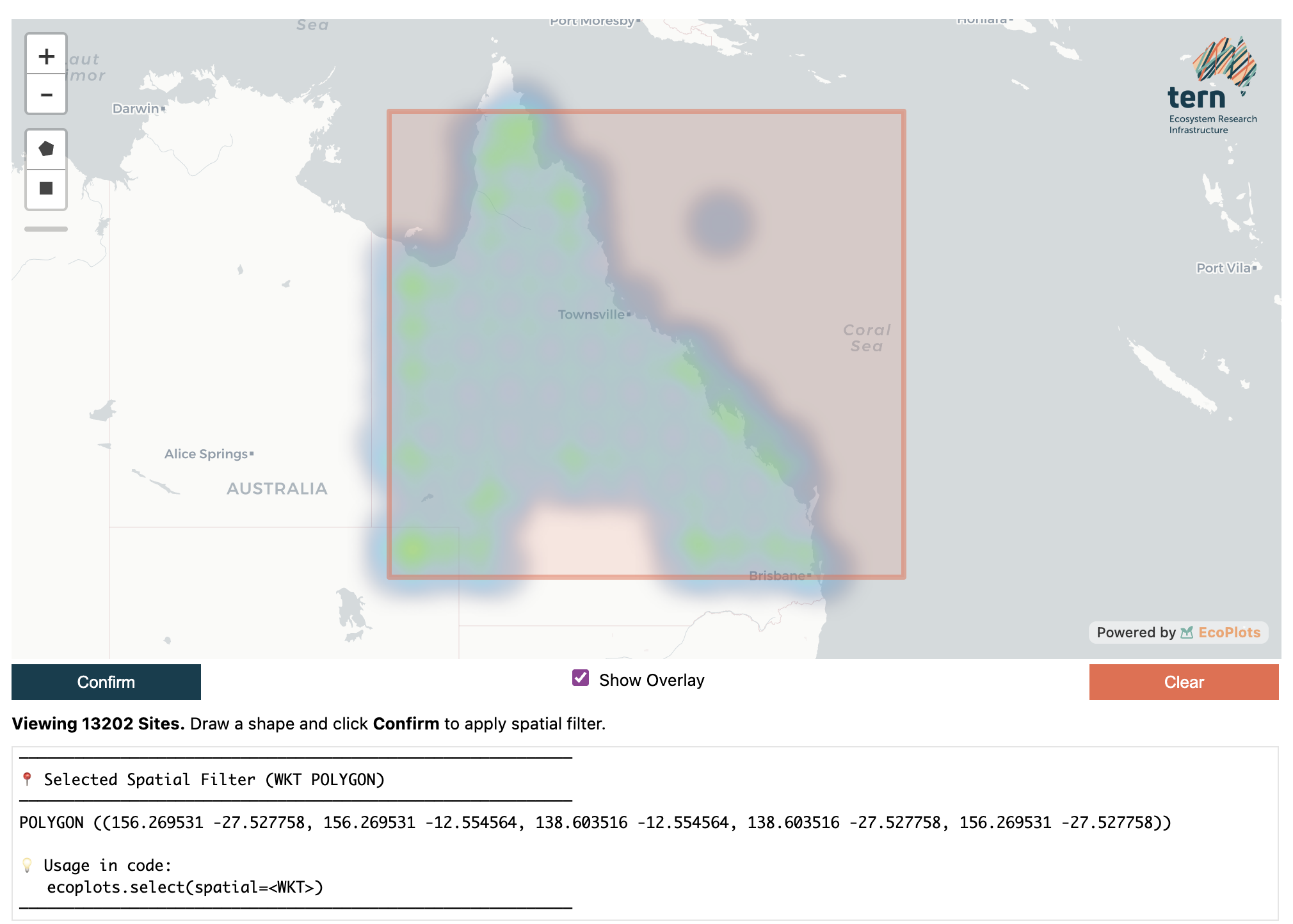
The spatial selector widget. Draw a rectangle or polygon, then click Confirm Selection to apply the spatial filter.
Data Preview & Retrieval
- EcoPlots.summary(dformat=None)[source]
Summarize the EcoPlots data.
- Parameters:
dformat (str | None) – The desired format for the summary. If
"json", returns the raw summarydictfrom the API. Defaults toNone, which returns apandas.DataFrame.- Returns:
When dformat is
"json", returns the raw summarydictfrom the API. Otherwise, returns apandas.DataFramewith columnsmetricandcountsummarising the current selection (e.g. total observations, unique sites, datasets).- Return type:
DataFrame | str
- EcoPlots.preview(dformat=None)[source]
Fetch a small preview of EcoPlots data. # noqa: DAR401, D415
Mirrors
get_data()but limits results to 10 records for a quick look.In
observationsmode, fetches CSV from up to 2 feature types (5 rows each). Insamplesmode, calls the samples endpoint and returns the first 10 rows;"geojson"/"json"formats are not supported in this mode.- Parameters:
dformat (str | None) – Output format. -
"geojson"or"json": returns a GeoJSON dict (observations only). -"pandas"(or"pd"): returns apandas.DataFrame. -"geopandas"(or"gpd") (default): returns aGeoDataFrame.- Returns:
Preview data in the requested format.
- Raises:
EcoPlotsError – If an invalid dformat is provided.
RuntimeError – If no feature types found (observations mode).
- Return type:
geopandas.GeoDataFrame | dict | str
- EcoPlots.get_data(allow_full_download=False, dformat='gpd')[source]
Retrieve EcoPlots data based on the current filters.
- Parameters:
allow_full_download (bool | None) – If True, allows downloading the full dataset without filters. Defaults to False.
dformat (str | None) – Output format. Use
"geopandas"/"gpd"for a GeoDataFrame (default),"pandas"/"pd"for a DataFrame,"parquet"/"pq"for Parquet bytes, or"geojson"/"json"for GeoJSON in observations mode. Insamplesmode,"geojson"/"json"are not supported and exactly onematerial_sample_typemust be selected before retrieval.
- Return type:
geopandas.GeoDataFrame
Examples
Observations:
ec = EcoPlots()
ec.select(site_id="TCFTNS0002")
gdf = ec.get_data()
df = ec.get_data(dformat="pd")
parquet_bytes = ec.get_data(dformat="pq")
geojson = ec.get_data(dformat="geojson")
Samples:
ec = EcoPlots("samples")
ec.select(material_sample_type="Plant Voucher Specimen")
gdf = ec.get_data()
parquet_bytes = ec.get_data(dformat="parquet")
- Raises:
RuntimeError – If no filters are set and allow_full_download is False.
EcoPlotsError – If an invalid dformat is provided.
- Returns:
Data in the requested format.
- Parameters:
allow_full_download (bool | None)
dformat (str | None)
- Return type:
geopandas.GeoDataFrame
- EcoPlots.export_data(path, dformat=None, allow_full_download=False)[source]
Retrieve current data and export it to a file.
The output format is inferred from
pathwhendformatis not provided. Supported extensions are.parquet/.pq,.csv,.json/.geojson,.gpkg,.shp, and.fgb. Parent directories are created automatically.- Parameters:
path (str | Path) – Destination file path.
dformat (str | None) – Optional explicit output format. Use
"pq"/"parquet","pd"/"pandas","gpd"/"geopandas", or"geojson"/"json".allow_full_download (bool | None) – If True, allows downloading the full dataset without filters. Defaults to False.
- Returns:
Absolute path to the written file.
- Return type:
str
Examples
ec = EcoPlots()
ec.select(site_id="TCFTNS0002")

ec.export_data("data/ecoplots.parquet")
ec.export_data("data/ecoplots.csv")
ec.export_data("data/ecoplots.geojson")

EcoPlots("samples").select(
    material_sample_type="Plant Voucher Specimen"
).export_data("samples.parquet")
Typical workflow
# 1. Check how many records match your filters
ec.summary()

# 2. Preview the first 10 rows before committing to a full download
ec.preview().head()

# 3. Download the full dataset as a GeoDataFrame
gdf = ec.get_data()

# 4. Or as a plain pandas DataFrame
df = ec.get_data(dformat="pd")

# 5. Or as Parquet bytes
parquet_bytes = ec.get_data(dformat="pq")

# 6. Observations can also be returned as GeoJSON
geojson = ec.get_data(dformat="geojson")

# 7. Or retrieve and save directly
ec.export_data("outputs/ecoplots.parquet")
ec.export_data("outputs/ecoplots.csv")
ec.export_data("outputs/ecoplots.geojson")
Async streaming
from terndata.ecoplots import AsyncEcoPlots

ec = AsyncEcoPlots()
ec.select(site_id="TCFTNS0002")

async for gdf_chunk in ec.get_data_stream(dformat="gpd"):
    ...

async for parquet_chunk in ec.get_data_stream(dformat="pq"):
    ...
Project Save / Load
Serialise your current filter selection to a .ecoproj file so you can
reproduce or share the exact query later.
- EcoPlots.save(path=None)
Save project state to a single .ecoproj file (atomic, checksummed).
Writes the current filters and query_filters into a compact binary file with a small header and a JSON (orjson) payload. The filename resolution is:
If path is None: save as ./ecoplots_<UTCSTAMP>.ecoproj.
- If path has no .ecoproj suffix and no parent directory: save as
./<name>.ecoproj in the current working directory.
If path ends with .ecoproj: save exactly to that location.
- Parameters:
path (str | Path | None) – Optional target path or bare name. If omitted, a timestamped filename is created in the current working directory.
- Returns:
Absolute path to the saved .ecoproj file.
- Raises:
Exception – Any unexpected error during the write; temporary files are cleaned up best-effort before re-raising.
- Return type:
str
- classmethod EcoPlots.load(path)
Load a .ecoproj file, validate integrity, and return a new instance.
- Parameters:
path (str | Path) – Path to a .ecoproj file previously created by
save().- Returns:
A new instance of the calling class with
filtersandquery_filtersrestored from the file.- Raises:
FileNotFoundError – If the file does not exist.
EcoPlotsError – If the file does not have a .ecoproj suffix, the magic header or version is invalid, the file is truncated, or the checksum does not match the payload.
- Return type:
SelfType
Example
# Save current filters to a timestamped file
path = ec.save()

# Or save to a specific name
path = ec.save("my_survey.ecoproj")

# Reload later
ec2 = EcoPlots.load(path)
ec2.get_filter()   # filters are fully restored